











Private tasks that only you can read
Encrypt a task and its title and description are locked on your device before they leave it. The key is made from your password, in your browser, and neither one is ever sent to us. Our servers only store the scrambled text, so a leak of our database exposes no readable titles or descriptions.
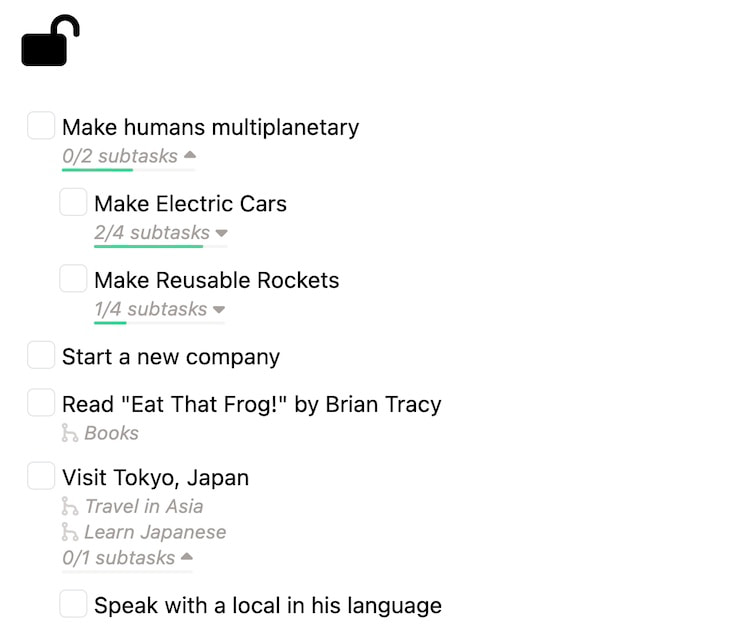
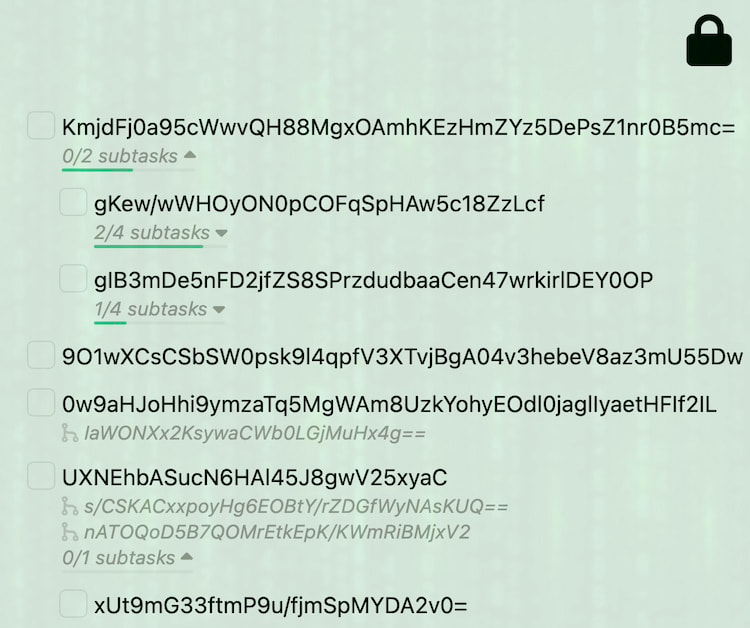
Encrypted on your device
When you log in, your browser turns your password into a key with Argon2id. Before an encrypted task is saved, its title and description are encrypted with that key using XChaCha20-Poly1305. The server only ever stores the scrambled text.
Most task apps encrypt your data too, but they hold the keys and can decrypt it whenever they want. PerspecTask never has your key.
- Encrypted in your browser, before it is sent
- The key comes from your password and stays on your device
- Works on every device you log in from
- Included on the free plan
You choose what is private
Encryption is set per task. From a task's menu, encrypt just that task, or the task and all its subtasks. Decrypt it the same way.
The New Tasks setting picks the default for tasks you create: Encrypted, Plaintext, or Auto, which encrypts whenever you have unlocked with your password.
Plaintext tasks for your AI agents
AI agents work through the CLI, MCP server and API, which only see tasks you leave in plaintext. Encrypted tasks come back with no title or description, and agents cannot change them. Keep the private ones encrypted and decrypt a task when you want an agent to help with it.
What stays readable
An encrypted task's title, description, KPI values and edit history are encrypted. The details the server needs to schedule, sort and sync your tasks stay readable: status, priority, dates, which task sits under which, tracked time, and linked pull requests.
How to encrypt a task
Create your account
Your password is what your key is made from. Pick one you will remember and keep it in a password manager.
Encrypt a task
Open the task menu, choose Encrypt Task, then Encrypt this task, or Encrypt this task & all children.
Lock and unlock
After a reload, encrypted tasks show as ENCRYPTED until you enter your password and click Decrypt Tasks. Lock Tasks (⌘⇧E) hides them again.
Frequently asked questions
- Can PerspecTask read my tasks?
- Not from what we store. Encrypted tasks are encrypted in your browser with a key made from your password, and neither the key nor the password is sent to us, so our database only holds the scrambled text. Tasks you leave in plaintext are stored as they are.
- What happens if I forget my password?
- Only your password can unlock your encrypted tasks, and we have no copy of your key, so we cannot recover them for you. Your plaintext tasks are not affected. Keep your password in a password manager.
- Which encryption does PerspecTask use?
- The key is derived from your password with Argon2id (64 MiB of memory, 12 passes), and task content is encrypted with XChaCha20-Poly1305 using a fresh random nonce each time.
- Is everything encrypted?
- Encryption is per task and covers the title, the description, KPI values and the edit history. The details the server needs to schedule and sync your tasks stay readable: status, priority, dates, the task hierarchy, tracked time and linked pull requests.
- Can I search encrypted tasks?
- Yes, once you have unlocked them. Search runs in your browser over your decrypted tasks, so nothing is sent to the server to search.
- Can AI agents read encrypted tasks?
- No. The CLI, MCP server and API never get the key, so they only see that an encrypted task exists and cannot read or change it. Agents work with your plaintext tasks.
Plan your life without anyone reading over your shoulder
Encryption is on the free plan. Keep your private goals encrypted and the rest open for your agents.