










Keep your streak, see your progress
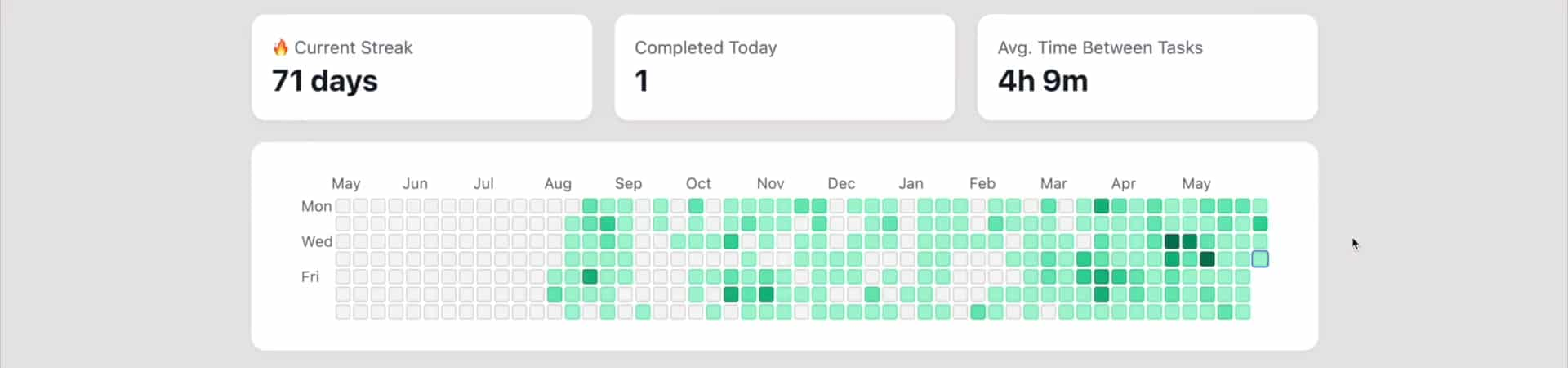
The Reflect page counts the days in a row you finished at least one task, completed or cancelled, draws them as a grid of days, and lists what you finished. Open it on the days it feels like nothing got done.
A streak that counts finished tasks
Your streak is the number of days in a row on which you finished at least one task: completed it, or cancelled it because it no longer mattered. It sits next to Reflect in the sidebar with a 🔥.
Haven't finished anything yet today? The streak still shows yesterday's count, with an hourglass and a reminder to finish a task. Finish one and it keeps going.
- One finished task a day keeps the streak
- Shown next to Reflect in the sidebar
- A reminder before it resets
- Unchecking a task takes it back out
A year of work, one square per day
The activity grid colors each day by how many tasks you finished, in four shades of green compared with your best day. Hover a square for the count and the date. Look at the last 365 days or at any year you finished tasks in.
Everything you did, on one page
Reflect also shows your current streak, the tasks finished today and the average time between tasks, plus Percentile Feedback, Work Cycles, Task Burn Rate, Task Creation, and a timeline of finished tasks and changes. Drag the sections into the order you want.
How to start a streak
Complete a task
Complete any task today. That is day one of your streak.
Open Reflect
Click Reflect in the sidebar to see your streak, what you finished today and the activity grid.
Keep it going
Finish at least one task every day. If today is still empty, the hourglass next to your streak reminds you.
Frequently asked questions
- What counts toward my streak?
- A day counts when you finish at least one task on it: completed or cancelled. The streak is the number of such days in a row, ending today or yesterday.
- When does my streak reset?
- When neither today nor yesterday has a finished task. Until the end of today, an empty today still shows yesterday’s streak with an hourglass, so you have time to save it.
- Does tracked time count toward the streak?
- No. The streak counts finished tasks. Your tracked time shows up in Work Cycles and Percentile Feedback on the same page.
- What do the colors in the activity grid mean?
- Each square is one day. The darker the green, the more tasks you finished (completed or cancelled) that day compared with your best day. Empty squares are days with no finished tasks.
- Can I change the order of the Reflect page?
- Yes. Drag its sections into any order: stats cards, activity grid, Percentile Feedback, Work Cycles, Task Burn Rate, Task Creation and the timeline.
Make progress you can see
Finish one task today, and watch the days add up.