











Track time without leaving your task list
Every task has a timer. Start it on the task you are doing, watch it in your browser tab, and PerspecTask adds the time to every goal above it. You find out how long a goal really took, not just its last step.
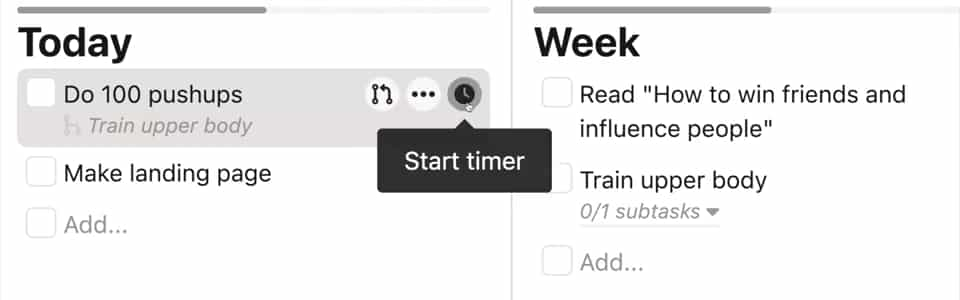
One timer, on the task you are doing
Click the clock on a task to start it and click again to stop. Only one timer runs at a time: starting a new one stops the old one, so you never time two things by mistake.
Starting a timer moves the task to In Progress, and the sidebar shows which task is running. Completing the task stops its timer.
- One click to start, one to stop
- Starting another timer stops the running one
- Synced live across your tabs and devices
- Works on encrypted tasks once you unlock them
The time in your browser tab
While a timer runs, the tab title shows the task's total time, like 25:13 | PerspecTask, and your total for today in brackets when it differs: 25:13 (1:42:07) | PerspecTask. Switch to another tab and you still see the clock.
The total for a whole goal
The task window shows a task's own time and, next to it, the time including all its subtasks. A subtask that sits under several goals counts toward each of them, so every goal shows the time spent on it.
Your sessions are kept
Each session longer than a few seconds is saved as a work interval, even after you delete the task. They all show up on the Work Cycles chart, where you can click one to fix a start or end time, for example when you forgot to stop the timer, or delete it.
How to time a task
Start the timer
Hover a task and click the clock icon. The task moves to In Progress and the time appears in your browser tab.
Work
Switch tasks whenever you like: starting another timer stops this one. Your laptop, phone and other tabs all show the same timer.
Stop or finish
Click the red stop button, or complete the task, which stops its timer. The time is added to the task and to every goal above it.
Frequently asked questions
- Can I run two timers at once?
- No. One timer runs at a time. Starting a timer on another task stops the one that was running, so every minute is counted once.
- Does the timer sync across devices?
- Yes. The timer runs on the server, so starting it on your laptop shows it running on your phone and in every other open tab within a second or two.
- Can I fix a timer I forgot to stop?
- Yes. Open Work Cycles on the Reflect page, click the session, and change its start or end time, or delete it. Sessions cannot overlap and cannot end in the future. Adding a session by hand is not possible.
- Does it include the time of subtasks?
- Yes. The task window shows the time including all subtasks, at every depth, next to the task’s own time.
- Is there a Pomodoro mode?
- The task timer counts up and has no built-in breaks. For focus sessions with breaks, use the free Pomodoro timer at perspectask.com/tools/pomodoro.
- Can an AI agent start a timer?
- No. Timers are started and stopped in the app. Agents using the PerspecTask CLI, MCP server or API can read how much time was worked on a plaintext task.
Find out where your time really goes
Time the task you are doing, and see the total for every goal it belongs to.